
Intuition GUI
Clorraine Studio is the native Intuition showcase: a normal Workbench window with text gadgets, a string field, and a Build button. The window opens on the default public screen. Intuition draws the frame, title bar, close gadget, palette, and font; the program defines no colours and no custom gadget images.
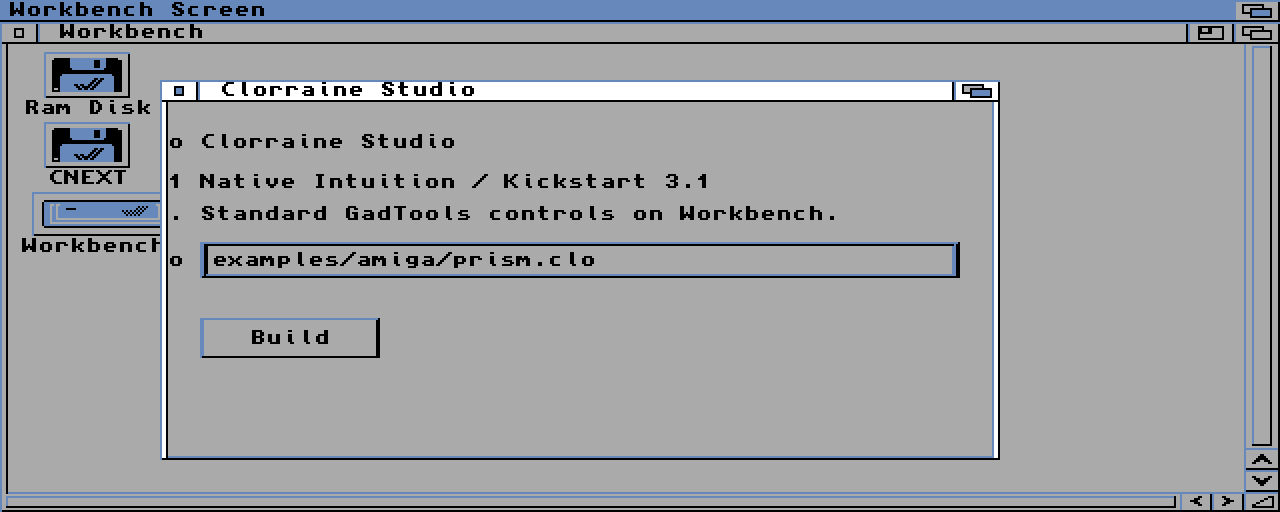
What it exercises
| Capability | Use in the demo |
|---|---|
| Screen | The default public screen (Workbench) through openWorkbenchWindow |
| Window | Native Kickstart 3.1 frame, drag bar, depth gadget, and close gadget |
| Gadgets | GadTools text labels, a string field, and a Build button |
| Menu | The source also attaches a Project menu with Build and Quit items |
| Colours | None set by the application; Intuition's DrawInfo owns them |
| Event loop | gadgetWaitEvent until the close gadget or a Quit action |
| Profile | hosted-amiga; GadTools is a Kickstart 2.0 library |
The important difference from the other showcases is what the program does not do. It does not open a custom screen, does not call setColor, and does not contain a gadget image. The window is a guest on the Workbench screen, so it inherits the user's palette, font, and window decorations.
A source excerpt
let window: Window? =
    openWorkbenchWindow(80, 40, 420, 190, toCString(title));
if (window == null) {
    println("gui-showcase: no Workbench screen");
    return 1;
}

let list: GadgetList = newGadgetList(window, toCString(fontName), 8);
addText(list, 1, toCString(heading), 16, 14, 300, 12);
addString(list, 4, toCString(initial), 64, 16, 70, 380, 18);
addButton(list, 5, toCString(buildLabel), 16, 108, 90, 20);
buildGadgets(list);
openWorkbenchWindow locks the default public screen and opens a plain NewWindow on it. std.amiga.gadtools creates the controls with the screen's VisualInfo, so the labels and gadgets use the Workbench font and palette. The source is examples/amiga/gui-showcase.clo.
Run it
make build FILE=examples/amiga/gui-showcase.clo PROFILE=hosted-amigaThen start the binary from a booted Workbench 3.x system. The program needs a running public Workbench screen. Boot the A1200 with Workbench 3.1, or use the SDK's Workbench fixture; a ROM-only insert-disk boot has no public screen, and the program prints gui-showcase: no Workbench screen and exits. It needs a display, so use FS-UAE rather than vamos.
What to inspect
- The title bar, borders, depth gadget, and close gadget are Intuition's, not a toolkit drawn by the application.
- The string field accepts typed text, and the Build button shows the normal pressed state.
- The palette is whatever the Workbench screen uses. The grey/blue colours in the capture are the Workbench 3.1 default, not an application theme.
- The event loop is a normal
whileloop overgadgetWaitEvent; closing the window ends it. - The source also builds a Project menu with Build and Quit items, so a real Workbench boot can exercise menu events.
The acceptance GUI (examples/amiga/gui.clo) is a separate, gated program. It keeps the 640×256 / 8-colour A500 / Kickstart 1.3 baseline and exercises requesters and command-key menus. This page shows the visual showcase.